Data Wrangling
Part II

Dr. Mine Dogucu

Data

glimpse(lapd)
Rows: 14,824
Columns: 4
$ job_class_title <fct> Police Detective II, Police Sergeant I, Police Lieuten…
$ employment_type <fct> Full Time, Full Time, Full Time, Full Time, Full Time,…
$ base_pay        <dbl> 119321.60, 113270.70, 148116.00, 78676.87, 109373.63, …
$ base_pay_level  <chr> "Greater than 100K", "Greater than 100K", "Greater tha…
Review of Aggregating Data

Data vs. Aggregate Data

Data

Observations

Aggregate Data

Summaries of observations

Aggregating Categorical Data

Categorical data are summarized with counts or proportions.

Counts and proportions

lapd |> 
  count(employment_type)
# A tibble: 3 × 2
  employment_type     n
  <fct>           <int>
1 Full Time       14664
2 Part Time         132
3 Per Event          28
lapd |> 
  count(employment_type) |> 
  mutate(prop = n/sum(n))
# A tibble: 3 × 3
  employment_type     n    prop
  <fct>           <int>   <dbl>
1 Full Time       14664 0.989  
2 Part Time         132 0.00890
3 Per Event          28 0.00189

Aggregating Numerical Data

Mean, median, standard deviation, variance, and quartiles are some of the numerical summaries of numerical variables. Recall

summarize(lapd, 
          mean_base_pay = mean(base_pay),
          sd_base_pay = sd(base_pay))
# A tibble: 1 × 2
  mean_base_pay sd_base_pay
          <dbl>       <dbl>
1        85149.      38423.

Aggregating Data By Groups

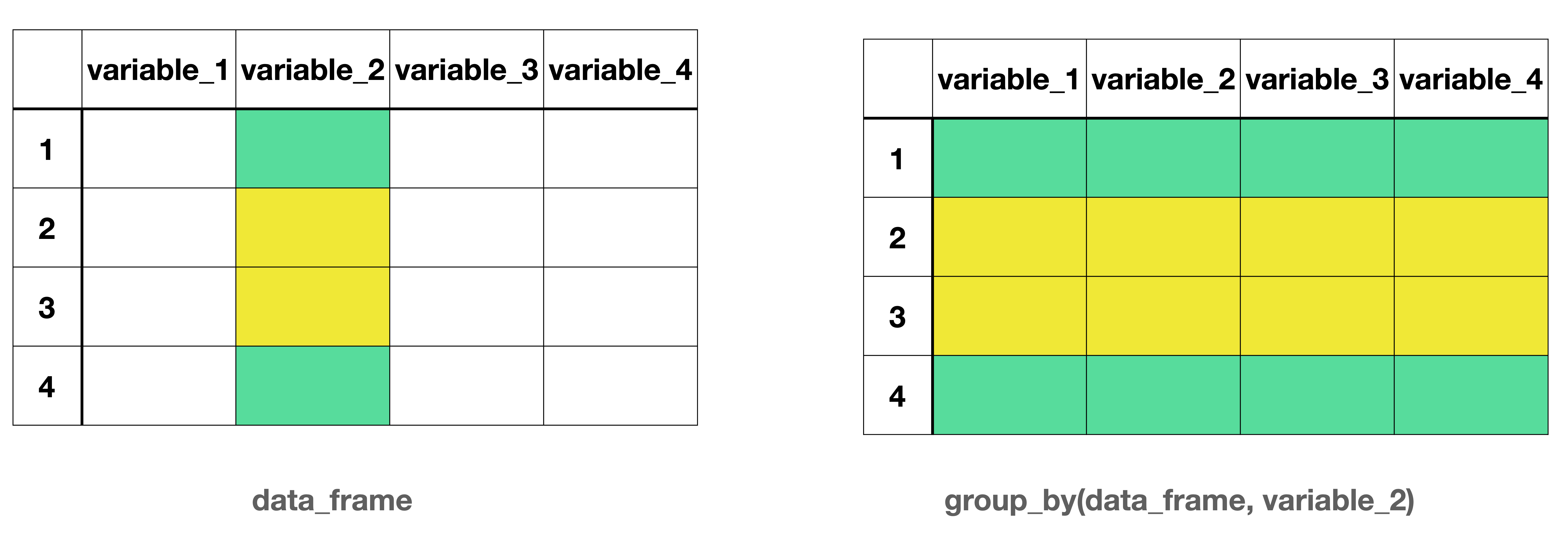
group_by()

Side-by-side schematic illustrating grouping in a data frame. On the left, a table labeled data_frame shows four rows (1–4) and four columns (variable_1 to variable_4). Values in variable_2 are highlighted with two colors, indicating two groups: rows 1 and 4 share one group, and rows 2 and 3 share another. On the right, a table labeled group_by(data_frame, variable_2) shows the same data with all columns present, but rows are visually grouped by variable_2, using the same colors across all columns to indicate group membership.

Figure 1: Grouping a data frame by a specific variable

group_by() separates the data frame by the groups. Any action following group_by() will be completed for each group separately.

Example

Q. What is the median salary for each employment type?

Example

lapd |> 
  group_by(employment_type)
# A tibble: 14,824 × 4
# Groups:   employment_type [3]
   job_class_title                  employment_type base_pay base_pay_level    
   <fct>                            <fct>              <dbl> <chr>             
 1 Police Detective II              Full Time        119322. Greater than 100K 
 2 Police Sergeant I                Full Time        113271. Greater than 100K 
 3 Police Lieutenant II             Full Time        148116  Greater than 100K 
 4 Police Service Representative II Full Time         78677. Between 0 and 100K
 5 Police Officer III               Full Time        109374. Greater than 100K 
 6 Police Officer II                Full Time         95002. Between 0 and 100K
 7 Police Officer II                Full Time         95379. Between 0 and 100K
 8 Police Officer II                Full Time         95388. Between 0 and 100K
 9 Equipment Mechanic               Full Time         80496  Between 0 and 100K
10 Detention Officer                Full Time         69640  Between 0 and 100K
# ℹ 14,814 more rows

Example

Note that when group_by() is used there have been no changes to the number of columns or rows. The only difference we can observe is now Groups: employment_type[3] is displayed indicating the data frame (i.e., tibble) is divided into three groups.

Example

lapd |> 
  group_by(employment_type) |> 
  summarize(med_base_pay = median(base_pay))
# A tibble: 3 × 2
  employment_type med_base_pay
  <fct>                  <dbl>
1 Full Time             97996.
2 Part Time             14474.
3 Per Event              4275 

Example

We can also remind ourselves how many staff members there were in each group.

lapd |> 
  group_by(employment_type) |> 
  summarize(med_base_pay = median(base_pay),
            count = n())
# A tibble: 3 × 3
  employment_type med_base_pay count
  <fct>                  <dbl> <int>
1 Full Time             97996. 14664
2 Part Time             14474.   132
3 Per Event              4275     28

Note that n() does not take any arguments.

Data Joins

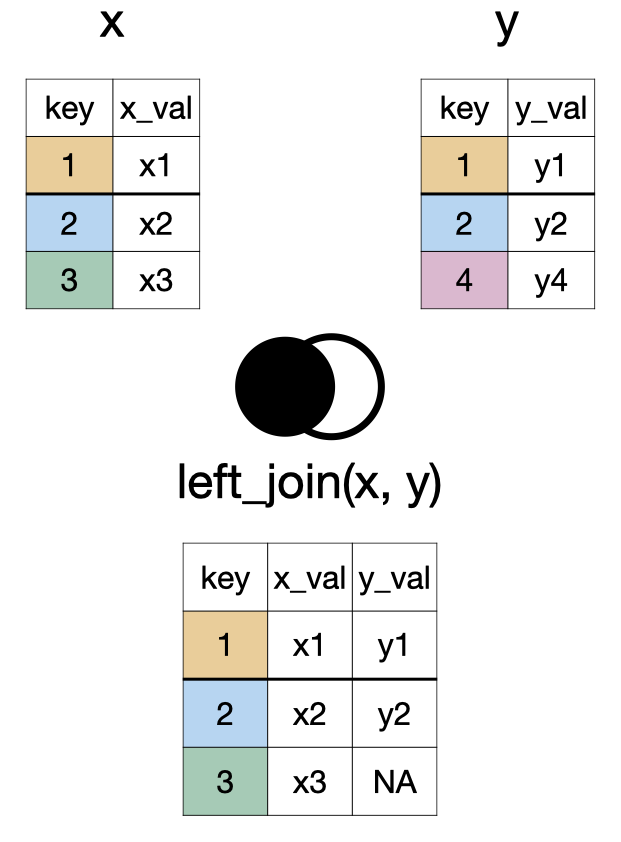
left_join(x, y)

A diagram showing two tables, X and Y, being combined into a new table. Table X has columns 'key' and 'x_val', with keys 1, 2, 3. Table Y has 'key' and 'y_val', with keys 1, 2, 4. The new combined table includes all rows from Table X. For each key present in both tables (1 and 2), the matching 'y_val' from Table Y is added. For keys only in Table X (key 3), the 'y_val' column is filled with 'NA' (Not Applicable)

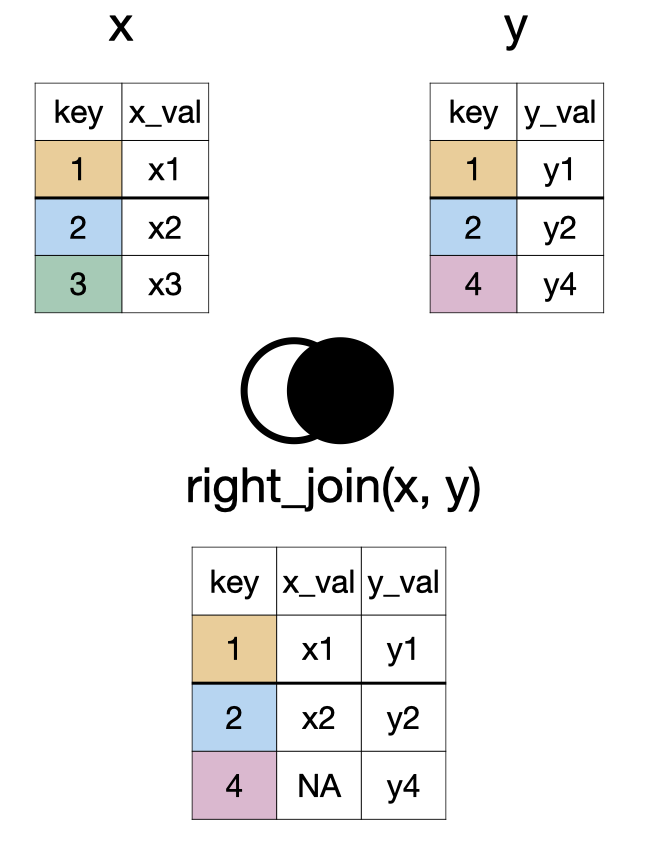
right_join(x, y)

A diagram showing two tables, X and Y, being merged based on a shared 'key' column. Table X has keys 1, 2, 3; Table Y has keys 1, 2, 4. The resulting combined table contains all rows from Table Y. Where keys match in both tables (1 and 2), corresponding values from X are included. For keys only present in Y (key 4), the 'x_val' column shows 'NA' (Not Applicable).

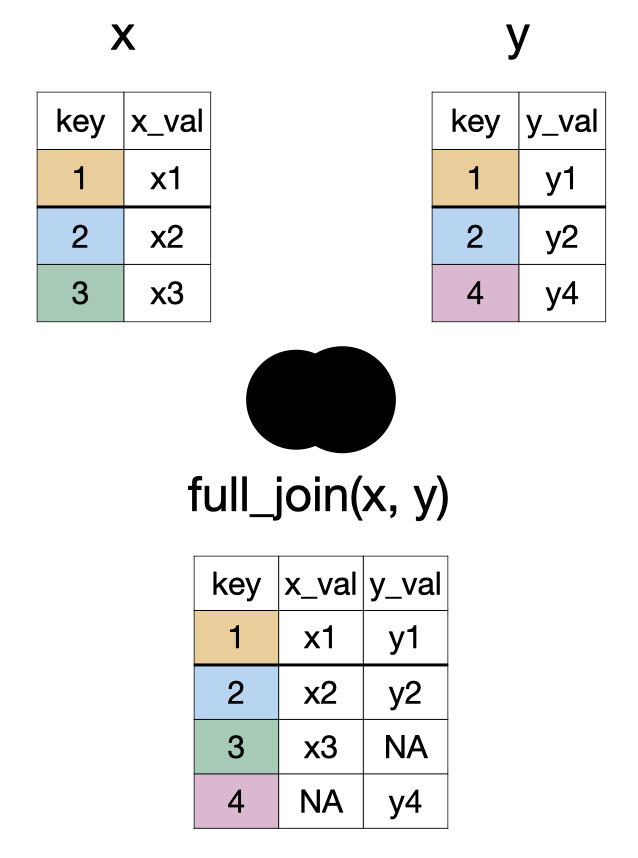
full_join(x, y)

A diagram showing two tables, X and Y, being merged based on a shared 'key' column into a new combined table. Table X has keys 1, 2, 3; Table Y has keys 1, 2, 4. The resulting table includes all keys present in either X or Y (keys 1, 2, 3, 4). For keys found in both tables (1 and 2), corresponding values from both X ('x_val') and Y ('y_val') are shown. For keys only in Table X (key 3), its 'x_val' is included, and 'y_val' is marked 'NA' (Not Applicable). For keys only in Table Y (key 4), its 'y_val' is included, and 'x_val' is marked 'NA'

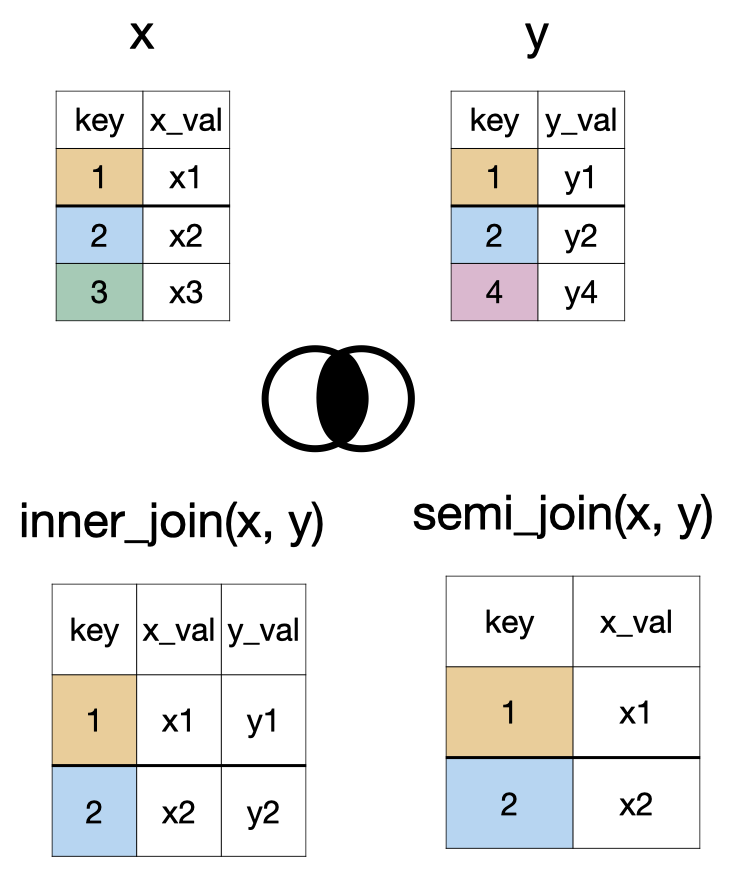
inner_join(x, y) and semi_join(x, y)

A diagram showing two ways to process data from two tables, X and Y, based on a common 'key' column. Table X has keys 1, 2, 3, with an 'x_val' for each. Table Y has keys 1, 2, 4, with a 'y_val' for each. 1.  Inner Combine (labeled 'inner_join'): A new table is created that only includes rows where the 'key' is found in *both* Table X and Table Y (keys 1 and 2). For these matching keys, the new table displays the key, its 'x_val' from Table X, and its 'y_val' from Table Y. 2. Semi Combine (labeled 'semi_join'): A new table is created by taking only those rows from Table X whose 'key' also  appears in Table Y (keys 1 and 2). This new table only displays the 'key' and 'x_val' from Table X.

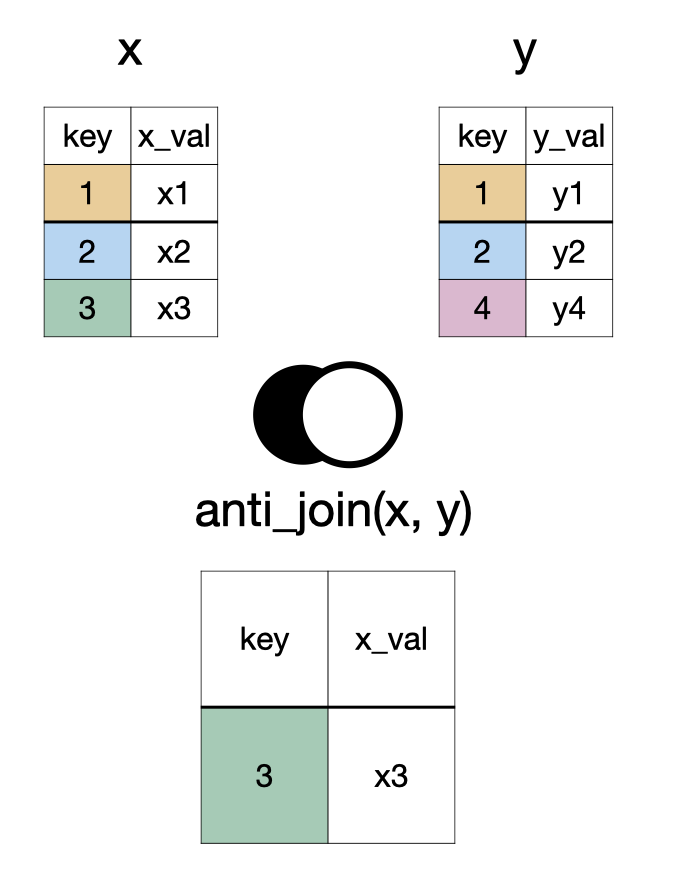
anti_join(x, y)

A diagram showing two tables, X and Y, being processed to create a new table. Table X has keys 1, 2, 3, with corresponding 'x_val' values. Table Y has keys 1, 2, 4, with corresponding 'y_val' values. The new table, labeled 'anti_join(x, y)', is formed by taking only those rows from Table X whose 'key' is *not* found in Table Y. In this example, only the row with key 3 from Table X (and its 'x_val') is included in the final result.

something_join(x, y)

Function x y
Type rows columns rows columns
left_join() all all matched all
right_join() matched all all all
full_join() all all all all
inner_join() matched all matched all
semi_join() matched all none none
anti_join() unmatched all none none

Data

artists
# A tibble: 3 × 2
  name          followers
  <chr>             <dbl>
1 Beyoncé        24757958
2 Taylor Swift   33098116
3 Ariana Grande  51807131
songs
# A tibble: 5 × 4
  name          song_name                            album_name  song_popularity
  <chr>         <chr>                                <chr>                 <dbl>
1 Beyoncé       Savage Remix (feat. Beyoncé)         Savage Rem…              83
2 Taylor Swift  cardigan                             folklore                 85
3 Drake         Laugh Now Cry Later (feat. Lil Durk) Laugh Now …              95
4 Beyoncé       Halo                                 I AM…SASHA…              NA
5 Ariana Grande Stuck with U (with Justin Bieber)    Stuck with…              NA
albums
# A tibble: 4 × 2
  album_name                           album_release_date
  <chr>                                <date>            
1 Savage Remix (feat. Beyoncé)         2020-04-29        
2 I AM…SASHA FIERCE                    2008-11-14        
3 Stuck with U                         2020-05-08        
4 Laugh Now Cry Later (feat. Lil Durk) 2020-08-14        

Relational Schema

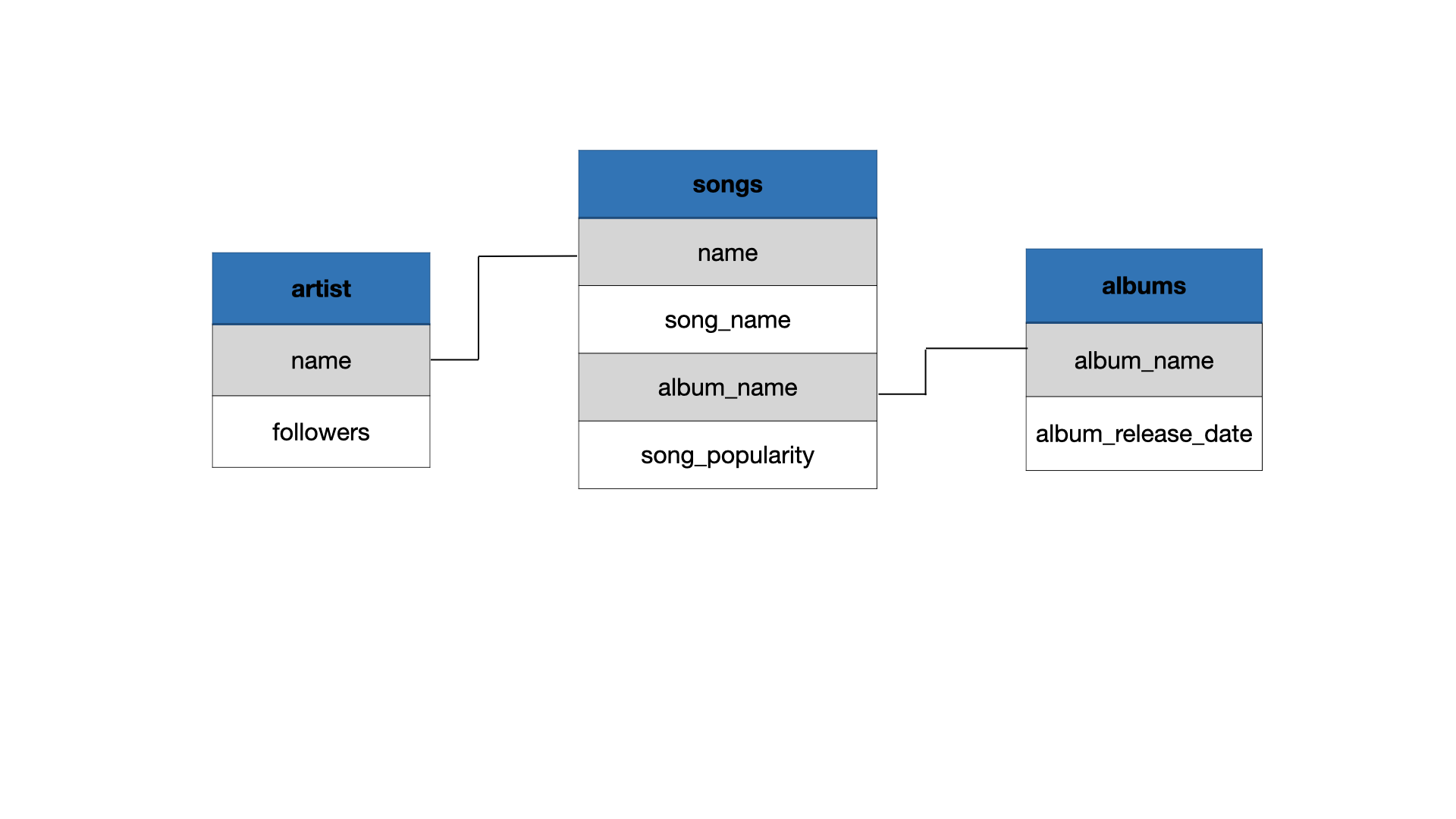
A diagram shows three related collections of music information: 'artist', 'songs', and 'albums'. The 'artist' collection includes the artist's name and their number of followers. The 'songs' collection lists the artist's name, the song's name, the album's name it's on, and its popularity. The 'albums' collection contains the album's name and its release date. Lines connect the artist's name from the 'artist' collection to the artist's name in the 'songs' collection, and similarly, album names link the 'songs' collection to the 'albums' collection. This structure connects song details to their respective artists and albums.

left_join()

left_join(songs, artists)
# A tibble: 5 × 5
  name          song_name                   album_name song_popularity followers
  <chr>         <chr>                       <chr>                <dbl>     <dbl>
1 Beyoncé       Savage Remix (feat. Beyonc… Savage Re…              83  24757958
2 Taylor Swift  cardigan                    folklore                85  33098116
3 Drake         Laugh Now Cry Later (feat.… Laugh Now…              95        NA
4 Beyoncé       Halo                        I AM…SASH…              NA  24757958
5 Ariana Grande Stuck with U (with Justin … Stuck wit…              NA  51807131

right_join()

right_join(songs, artists)
# A tibble: 4 × 5
  name          song_name                   album_name song_popularity followers
  <chr>         <chr>                       <chr>                <dbl>     <dbl>
1 Beyoncé       Savage Remix (feat. Beyonc… Savage Re…              83  24757958
2 Taylor Swift  cardigan                    folklore                85  33098116
3 Beyoncé       Halo                        I AM…SASH…              NA  24757958
4 Ariana Grande Stuck with U (with Justin … Stuck wit…              NA  51807131

full_join()

full_join(songs, artists, by = "name")
# A tibble: 5 × 5
  name          song_name                   album_name song_popularity followers
  <chr>         <chr>                       <chr>                <dbl>     <dbl>
1 Beyoncé       Savage Remix (feat. Beyonc… Savage Re…              83  24757958
2 Taylor Swift  cardigan                    folklore                85  33098116
3 Drake         Laugh Now Cry Later (feat.… Laugh Now…              95        NA
4 Beyoncé       Halo                        I AM…SASH…              NA  24757958
5 Ariana Grande Stuck with U (with Justin … Stuck wit…              NA  51807131

full_join() x2

full_join(songs, artists, by = "name") |> 
  full_join(albums, by = "album_name")
# A tibble: 5 × 6
  name         song_name album_name song_popularity followers album_release_date
  <chr>        <chr>     <chr>                <dbl>     <dbl> <date>            
1 Beyoncé      Savage R… Savage Re…              83  24757958 2020-04-29        
2 Taylor Swift cardigan  folklore                85  33098116 NA                
3 Drake        Laugh No… Laugh Now…              95        NA 2020-08-14        
4 Beyoncé      Halo      I AM…SASH…              NA  24757958 2008-11-14        
5 Ariana Gran… Stuck wi… Stuck wit…              NA  51807131 2020-05-08        

Practice

Complete the questions provided to you in the lecture notes.

Learning Tip of the Day

Reappraising test anxiety increases academic performance of first-year college students