Web scraping
A Brief Introduction to HTML & CSS
Hypertext Markup Language
Cascading Style Sheets
An ugly web page

HTML document outline
HTML document outline - code
In the previous screencast we wrote the following code in an html document.
Paragraphs
Paragraphs - code
In the previous screencast we wrote the following code in an html document.
Hyperlinks
Hyperlinks - code
In the previous screencast we wrote the following code in an html document.
<html>
  <head></head>

  <body>
    <p><a href="[https://www.r-project.org/](https://www.r-project.org/)">R</a>
    is a language that first appeared in 1994.
      My favorite language is R.</p>

    <p><a href="[https://www.python.org/](https://www.python.org/)">Python
    </a> is a language that first appeared in 1990
    .</p>
  </body>

</html>
Understanding each part of an hyperlink
<a href="https://www.r-project.org/">R</a>
<a> </a>
HTML tag
href
attribute (name)
https://www.r-project.org/
attribute (value)
R
content
Spans
Spans - code
In the previous screencast we wrote the following code in an html document.
<html>
  <head></head>

  <body>
    <p><a href="[https://www.r-project.org/](https://www.r-project.org/)">R</a> is a
    language that first appeared in <span>1994</span>.
    <span>My favorite language is R</span>.</p>

    <p><a href="[https://www.python.org/](https://www.python.org/)">Python</a> is a
    language that first appeared in <span>1990</span>.</p>
  </body>

</html>
Styling
Styling - code
In the previous screencast we wrote the following code in an html document.
<html>
  <head>
    <style>
      body {
        background-color: lightgray;
        font-size: 40px;
      }

      .year {
        color: red;
      }

      #favorite {
        font-style: italic;
      }
    </style>
  </head>

  <body>
    <p>
      <a href="https://www.r-project.org/">R</a> is a language that
      first appeared in <span class="year">1994</span>.
      <span id="favorite">My favorite language is R</span>.
    </p>

    <p>
      <a href="https://www.python.org/">Python</a> is a language that
      first appeared in <span class="year">1990</span>.
    </p>
  </body>
</html>
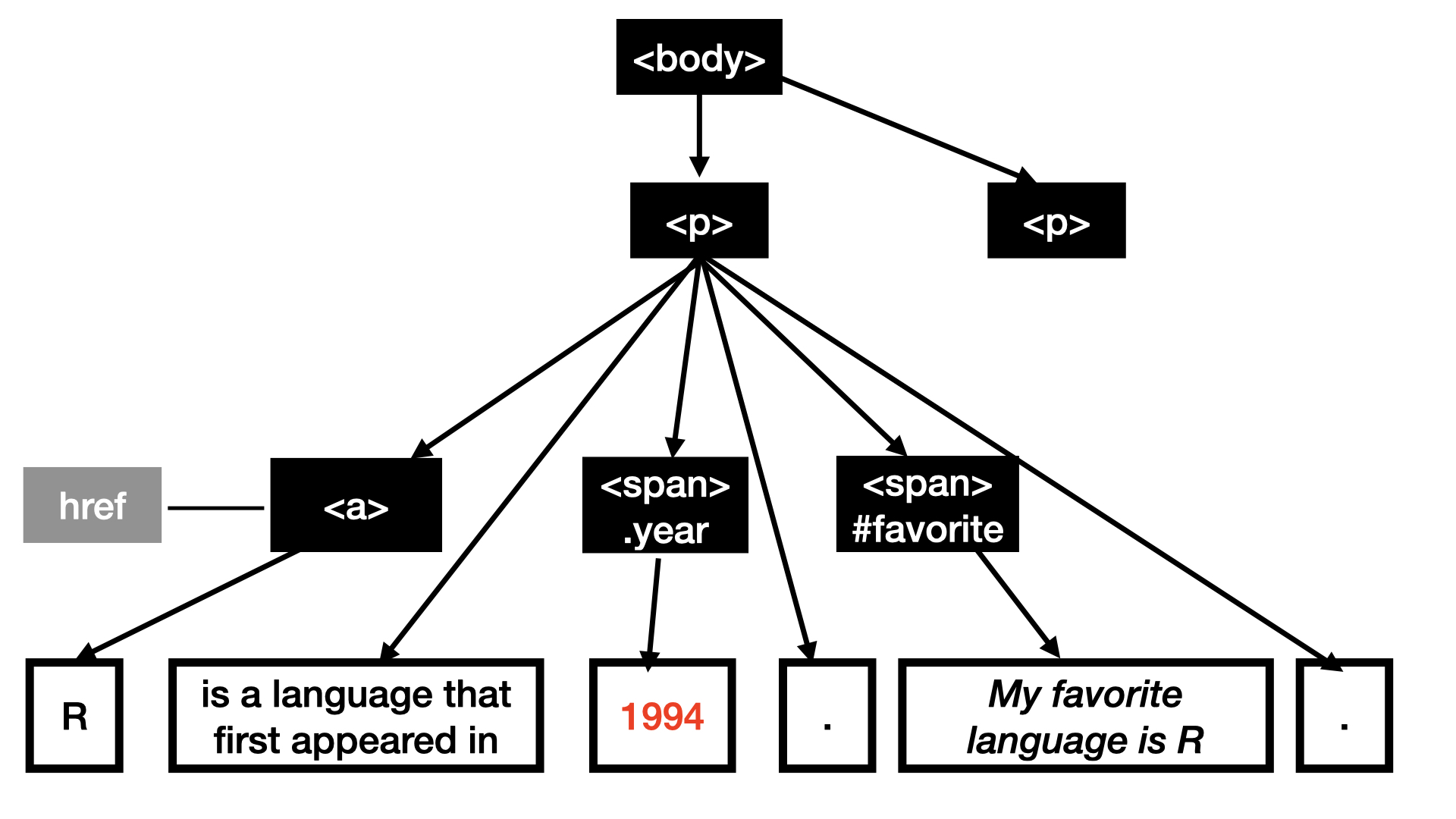
Part of an HTML tree
Web Scraping Demo
in your weekly repos
Demo Summary
Always check if bot access is allowed
robotstxt::paths_allowed()We use
library(rvest)for scraping data.The
read_html()returns the html content of a web page for a given url.The
html_element()function helps us select certain CSS classes and IDS.The
html_text2()function returns the text content
Selector Gadget
Selector Gadget Chrome Extension helps find CSS selectors.
Considerations
Finding data online does not grant permission to scrape and use the data
Is it ethical? Be especially mindful when using data from human subjects. Check out Institutional Review Board for regulations on doing research with human subjects data.
Is it legal? Check terms of use. Commercial use may not be permitted.